
Machine Monitoring for New & Legacy Machines
Compatibility & Connections
You can monitor older machines with FactoryWiz, even if they have no Ethernet port. FactoryWiz connects to modern controls through:
- FANUC FOCAS
- MTConnect
- OPC UA
- Scroll down to see our full Native Ethernet Connections chart
FactoryWiz offers machine monitoring as an on-prem deployment. Fully own your data inside your secure firewall, no subscriptions or “clouds” involved.
>> Scroll down to see our monitoring solutions chart
FactoryWiz Native Ethernet Connections
| Basic Data | Advanced Data | |||||||||||
|---|---|---|---|---|---|---|---|---|---|---|---|---|
| Machine Control | Cycle Time & Part Count ** | Part Name ** | Feed Hold | Alarm Recording | Email/Cell Phone Alerts | Feed/Rapid/Spindle Override | Spindle Load | Specific Alarm Names | Current Tool Indicator | Macro Variables | Tool & Workpiece Offsets | PLC Data Monitoring |
Allen Bradley PLC | Supported | Supported | Supported | Supported | Supported | Supported | Supported | Supported | Not available | Supported | Not available | Supported |
BrotherB00 / C00 / Speedio | Supported | Supported | Supported | Supported | Supported | Supported | Not available | Not available | Supported | Supported | Supported | Not available |
Fagor8055 / 8065 / 8070 | Supported | Supported | Supported | Supported | Supported | Supported | Not available | Supported | Supported | Not available | Supported* | Not available |
Fanuc FOCAS | Supported | Supported | Supported | Supported | Supported | Supported | Supported | Supported | Supported | Supported | Supported | Supported |
HaasMDC or NextGen (NGC) | Supported | Supported | Supported | Supported | Supported | NGC | Not available | NGC*** | Supported | Supported* | Supported* | Not available |
Heidenhaini530 / i640 | Supported | Supported | Supported | Supported | Supported | Supported | Not available | Supported | Supported | Supported* | Not available | Not available |
Kitamura Arumatik | Supported | Supported | Supported | Supported | Supported | Supported | Supported | Supported | Supported | Supported | Supported | Not available |
MazakFusion / Matrix / Smooth G & X | Supported | Supported | Supported | Supported | Supported | Supported | Not available | Supported | Supported | Supported* | Supported* | Not available |
Mitsubishi EDMAll Ethernet models | Supported | Supported | Not available | Supported | Supported | Not available | Not available | Not available | Not available | Not available | Not available | Not available |
MT Connect***Citizen, DMG Mori, Hurco, Makino EDM, Omax WaterJet, Zeiss CMM & more | Supported | Supported | Supported | Supported | Supported | Supported | Supported | Supported | Supported | Not available | Not available | Not available |
Okuma THiNC | Supported | Supported | Supported | Supported | Supported | Supported | Supported | Supported | Supported | Not available | Not available | Supported |
SiemensOPC/UA or OPC/DA | Supported | Supported | Supported | Supported | Supported | Supported | Supported | Supported | Supported | Not available | Not available | Not available |
System 3R Cell | Supported | Supported | Not available | Supported | Supported | Not available | Not available | Not available | Not available | Not available | Not available | Not available |
Traub OPC/UA | Supported | Supported | Supported | Supported | Supported | Supported | Not available | Not available | Not available | Not available | Not available | Not available |
UMATI*** | Supported | Supported | Supported | Supported | Supported | Supported | Supported | Supported | Supported | Not available | Not available | Not available |
Digital Signal Monitor*** | Supported | Not available | Supported | Supported | Supported | Not available | Not available | Not available | Not available | Not available | Not available | Not available |
Digital Signal Monitor & RS232 w/ Macro*** | Supported | Supported | Supported | Supported | Supported | Not available | Not available | Not available | Supported* | Supported* | Supported* | Supported* |
The following table shows data that is available from either a tablet mounted on the machine or ERP or a combination of both.
| Manual Data | Any Machine | |
|---|---|---|
| Tablet Data | Idle Reason (Realtime and retrospective) | Supported |
| Machine Modes | Supported | |
| Production | Supported | |
| Setup | Supported | |
| Inspection | Supported | |
| Maintenance | Supported | |
| Request Assistance (Text or Email) | Supported | |
| Part Progress Percentage | Supported | |
| Batch Progress Percentage | Supported | |
| Reject Parts | Supported | |
| Preventative Maintenance Tasks | Supported | |
| DNC – Transfer CNC Programs | Supported | |
| ERP and Tablet | Work Order Number | Supported |
| Operator Name | Supported | |
| Batch Quantity | Supported | |
| Expected Run Time | Supported | |
| Parts Per Cycle | Supported |
Legacy machines often can’t connect to modern monitoring systems on their own. FactoryWiz connects to newer controls through protocols like FANUC FOCAS and MTConnect, and to older equipment through digital signals. FactoryWiz allows you to track machine states, part counts, and alarms on new and older machines on one monitoring platform.
Digital transformation and smart manufacturing can start with one operational question: how much of the day are your machines running? Machine data from every machine lets you measure overall equipment effectiveness (OEE).
3 Ways FactoryWiz Connects to Your Machines
1. Native Ethernet protocols (newer controls)
Newer controls send machine status over Ethernet. These are the easiest to install and give you the most data. FactoryWiz supports FANUC FOCAS, MTConnect, OPC UA and OPC DA, Okuma THINC, umati, and native connections for Brother, Fagor, Haas, Heidenhain, Kitamura, Mazak, Mitsubishi EDM, Siemens, System 3R, Traub, and Allen Bradley PLCs.
2. Digital Signal Monitor (machines without Ethernet)
If your machine has no data port, FactoryWiz can still track it. The Digital Signal Monitor reads signals from the machine. You get cycle time and part count, feed hold, alarm recording, and email or text alerts.
3. Digital Signal Monitor + RS-232 with DPRNT (older CNCs with a serial port)
Many older CNC controls can send data out of an RS-232 port with the DPRNT command. FactoryWiz combines that data with digital signals. You get everything from the Digital Signal Monitor, plus part name. If your machine has DPRNT, you can also capture current tool, macro variables, tool and workpiece offsets, and PLC data.
How to Monitor a CNC Machine with No Ethernet Port
Our FactoryWiz team has direct experience working with older CNC machines. Here’s what you can expect as you work with us:
Contact us through our form and we’ll reach out to discuss how FactoryWiz can connect to each of your machines.
Send us your machine list. Include the make, model, control, and year.
We’ll match each machine to a connection type. Ethernet protocol, Digital Signal Monitor, or Digital Signal Monitor with RS-232.
We’ll tell you what data to expect. Some data depends on the signals or software version your machine has.
Our experienced installation engineers will work with your teams (IT included), to install and connect FactoryWiz.
Your team can use a tablet to add what the machine can’t report. Operators use the FactoryWiz tablet to enter idle reasons, setup, inspection, and maintenance time.
Eliminate Data Gaps from Older Machines with a FactoryWiz Tablet
Some data can’t come from the control. A tablet at the machine fills the gap on any machine, new or old. Operators can log:
- Idle reasons in real-time or after the fact
- Machine modes
- Preventive maintenance tasks
- Requests for help by text or email
FactoryWiz can also pull work order number, operator name, batch quantity, expected run time, and parts per cycle from your ERP or the tablet.
Keep Your Data Secure and Your Budget Under Control
FactoryWiz uses a one-time perpetual license with no subscription. Your data stays in your facility. Contact us for pricing based on your specific setup, with volume pricing starting at 15 or more machines.
Not Sure If Your Machine Is Compatible? Ask Us!
Contact us through our form and tell us about your machines. We’ll tell you how each machine connects and what data you will get. FactoryWiz has over 40 years of experience connecting shop floor equipment.
Frequently Asked Questions
Yes. FactoryWiz can read digital signals from the machine. You can track cycle time and part count, feed hold, and alarms, and get email or text alerts.
Yes. FactoryWiz can read digital signals from the machine. You can track cycle time and part count, feed hold, and alarms, and get email or text alerts.
Not always. Newer controls give you the most data. Older machines connected through digital signals give you cycle time, part count, and alarms. The chart on this page shows what you can expect from each control.
Yes. FactoryWiz handles a wide range of capabilities within the same site.
Operators use the FactoryWiz tablet at the machine. They can log idle reasons, setup, inspection, maintenance, and rejected parts on any machine, new or old.
Sometimes. Part name, cycle time, and part count may require adding a code to the CNC program. We’ll work with you to complete this process if needed.
Send us the make, model, and control using the form on this page. Some data depends on the signals or software version your machine has, so we will tell you what you can collect.
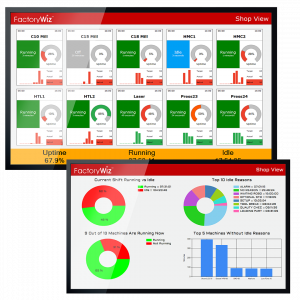
Absolutely. FactoryWiz sends email or text alerts for alarms on both Ethernet-connected machines and machines using digital signals. This helps when you run lights-out or over a weekend. Your machine data can also be displayed on large TVs so you’ll be able to see your shop’s current status at a glance.
No. FactoryWiz uses a one-time perpetual license. You own your data, and it stays under your control. Most shops add our annual support plan, which keeps your software updated and gives you direct access to our responsive FactoryWiz support team.
Yes. You can view FactoryWiz dashboards on any web-enabled device.
If you still have questions, contact us through the form on this page. Someone from our experienced team will contact you to discuss your options.